
We are phasing out Zendesk. Please see Discourse instead: https://community.getmailspring.com/t/enable-all-mail-folder-for-gmail/315
Error message: "Your account is missing the 'All Mail' folder. This is probably due to 'Show in IMAP' being disabled."
Explanation: Your Gmail account doesn't have an "All Mail" folder, preventing Mailspring from syncing it. Thankfully, it's easy to enable it!
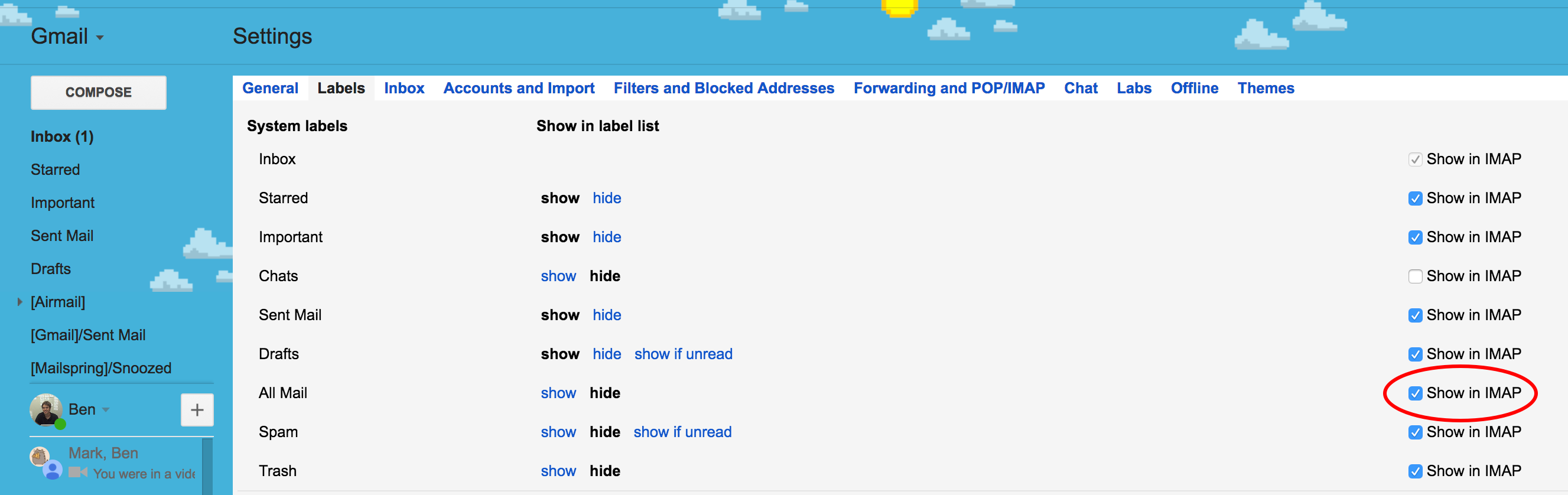
To do it, you'll just need to sign in to Gmail from a web browser, go to Settings / Labels and check "Show in IMAP" next to "All Mail."
Comments
0 comments
Article is closed for comments.